Most warmup tools do the same core job. They connect to your mailbox, exchange email with a network of other inboxes, and pull those messages out of spam so mailbox providers see a sender who gets opened and answered. The real differences sit elsewhere: how the tool charges (per mailbox or flat), whether warmup comes bundled inside a sending platform you may already pay for, which providers it supports, and how much monitoring it adds. This page compares six tools on those points, with every price taken from each tool's own pricing page and its billing period stated.
Who this comparison is for
This comparison is for anyone about to send cold email from new or recently set up mailboxes on Google Workspace, Microsoft 365, or another provider. It also covers anyone whose existing mailboxes have started landing in spam. It is most useful if you run more than one mailbox. That is where the pricing model starts to matter more than the feature list.
One thing to settle first. Saleshandy's guide to email warm-up tools makes the point well: no warmup tool directly gives you inbox placement. What it does is build sender reputation gradually. Your DNS setup, your list, your copy and your sending volume still decide where campaign mail lands.
How the tools were compared
- Pricing model. Per mailbox, per slot, or flat. With 10 or more mailboxes, this decides the bill.
- Billing period. Several pricing pages show yearly or quarterly prices by default. Every price below names its period.
- Free start. Whether you can warm a mailbox before paying, and how many.
- Bundled or standalone. Whether warmup is sold alone or comes inside a cold email platform.
- Monitoring. Placement tests, spam tests, blacklist checks and DNS checks, where the tool's pages describe them.
- Providers. Which mailbox types the tool says it connects to.
Comparison table
| Tool | What it is | Pricing model | Entry price | Free option | Notable inclusions |
|---|---|---|---|---|---|
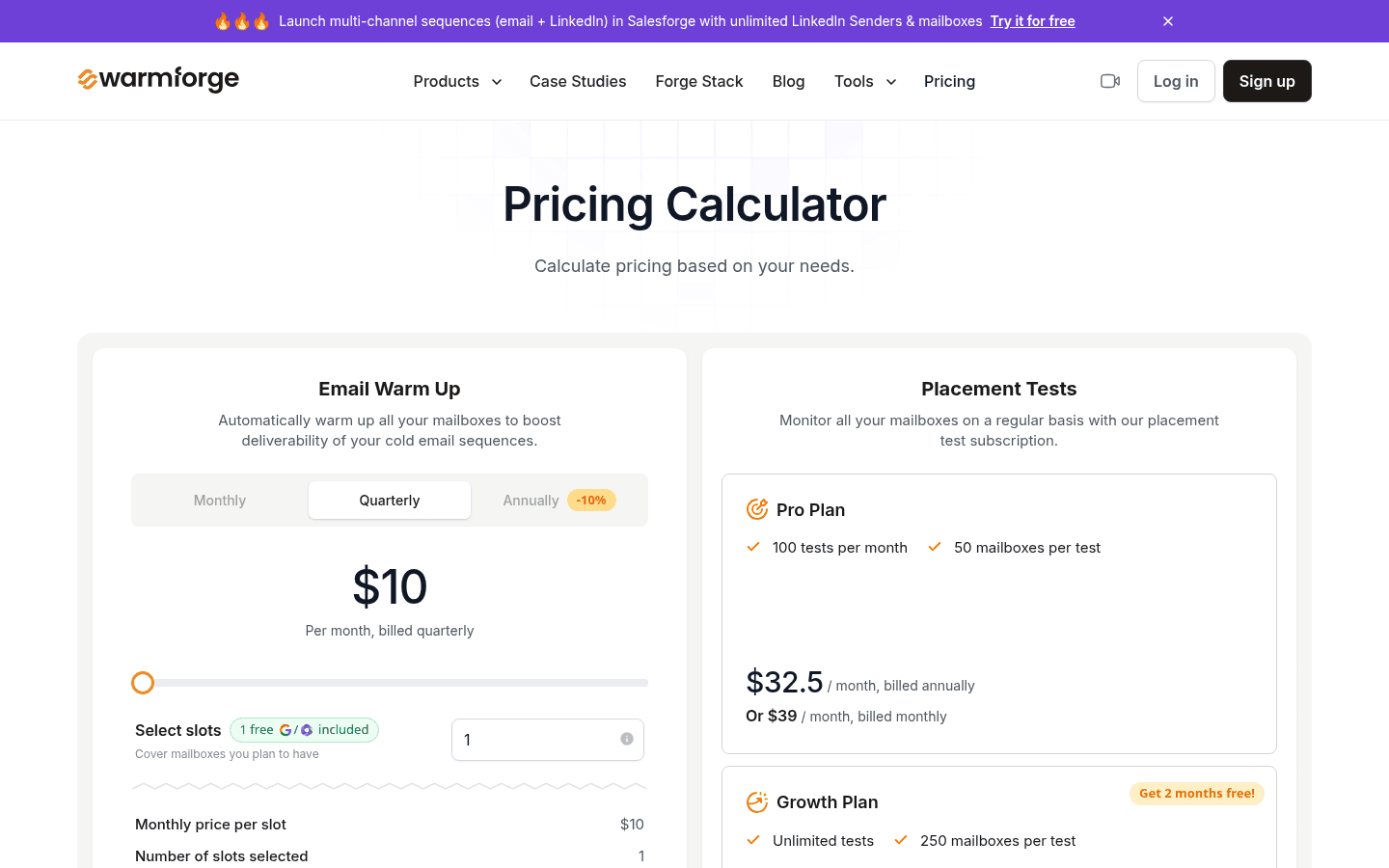
| Warmforge | Standalone warmup and deliverability tool | Per mailbox slot | $10 per slot per month, billed quarterly | 1 free warming slot (Google or Microsoft mailbox) and 1 free placement test per month | Health checks on DNS, MX records and blacklist status |
| Lemwarm (lemlist) | Warmup included in the lemlist outreach platform | Flat per plan | lemlist Email plan from $55/mo, billed yearly | 14-day free trial of lemlist, no credit card | Email plan includes unlimited users and email senders, 50,000 emails/mo, warmup and a deliverability hub |
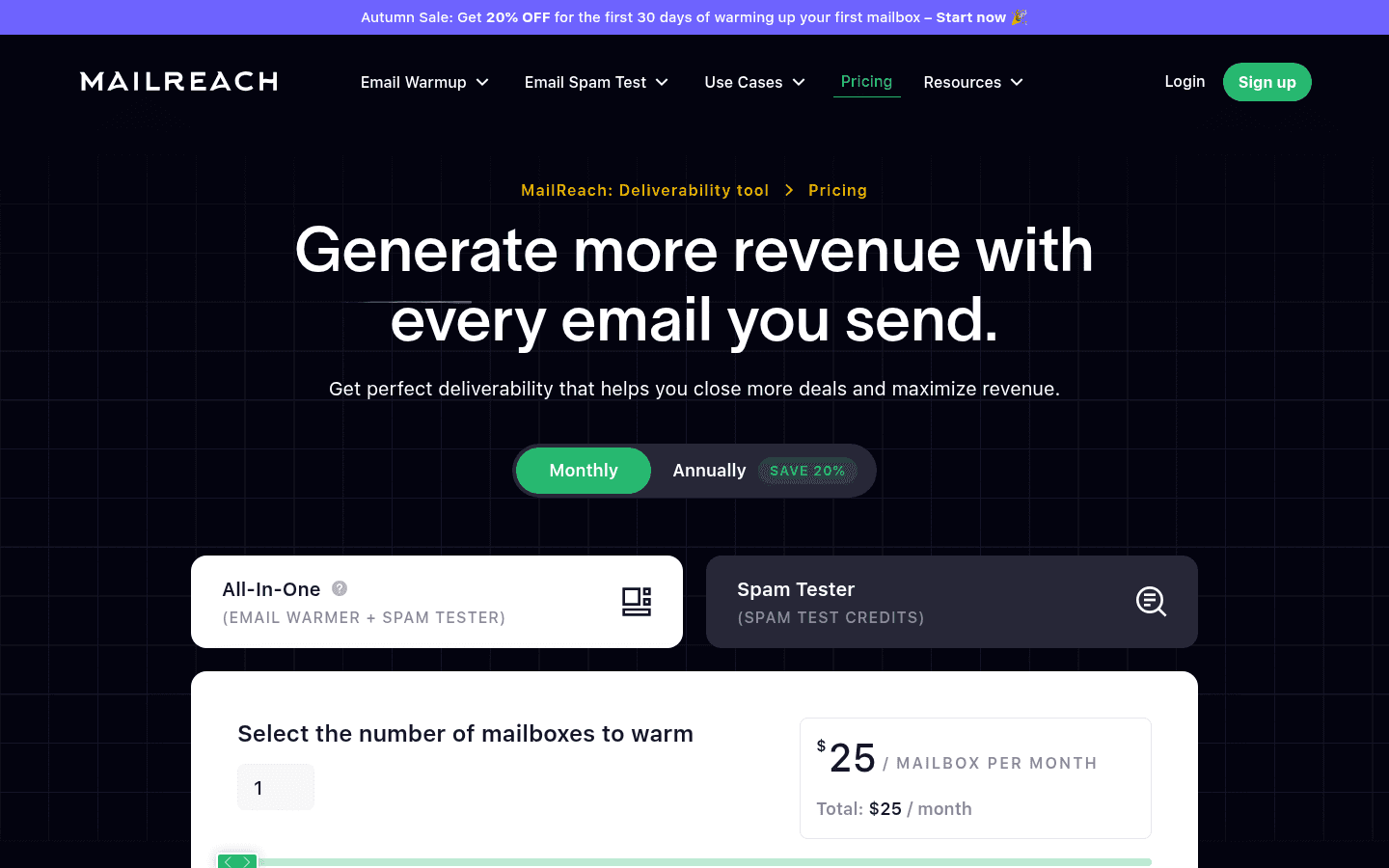
| MailReach | Standalone warmup plus spam testing | Per mailbox | $19.5 per mailbox per month on monthly billing; annual billing marked as saving 20% | Free spam test | At least 20 spam test credits, up to 100 emails per day, blacklist, SPF, DKIM, DMARC and ETS checks |
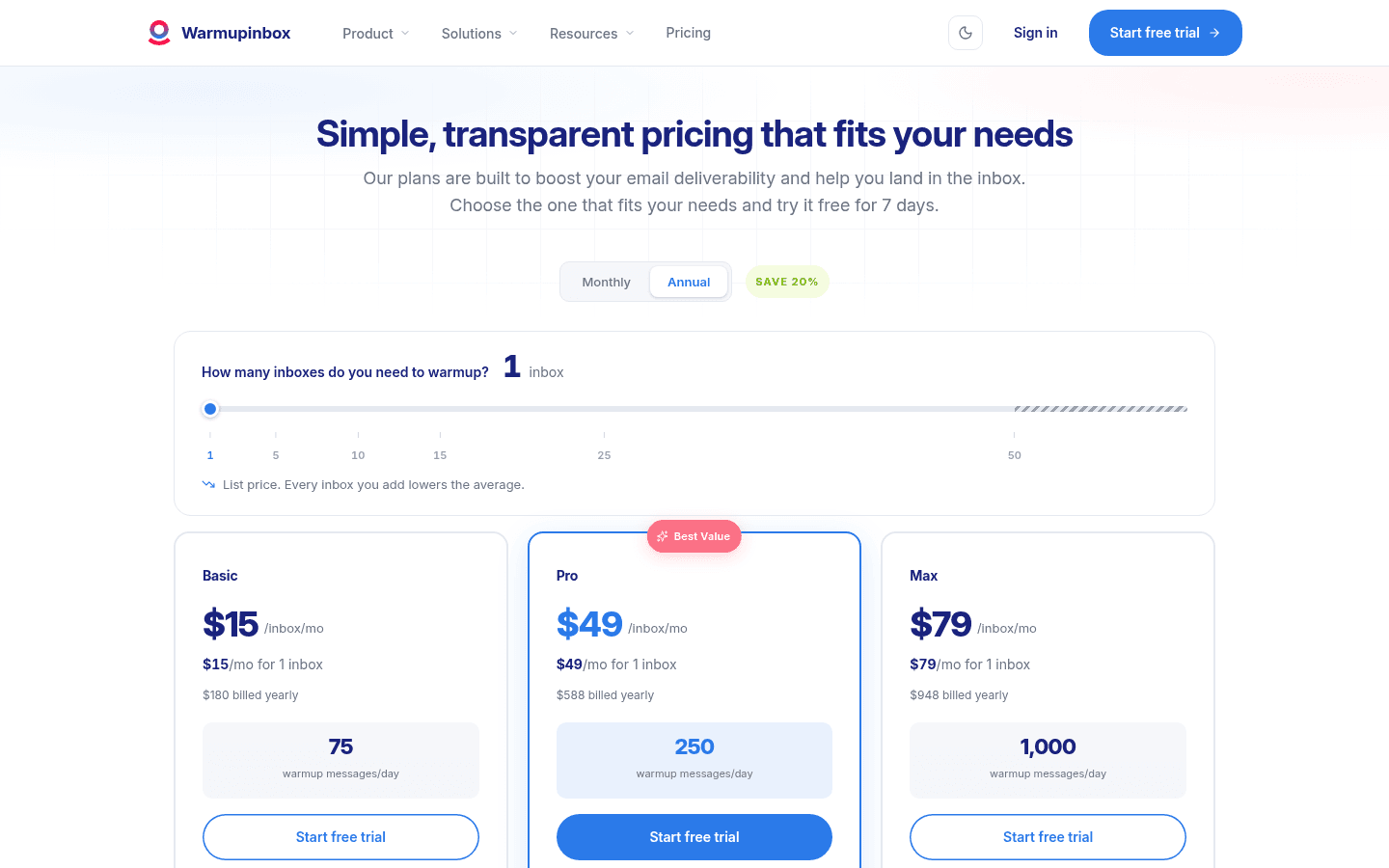
| Warmup Inbox | Standalone warmup tool | Per inbox, by plan | Basic $15/mo for 1 inbox, billed yearly ($180/yr) | 7-day free trial, no credit card | 30,000+ real inboxes, 75 to 1,000 warmup messages per day depending on plan |
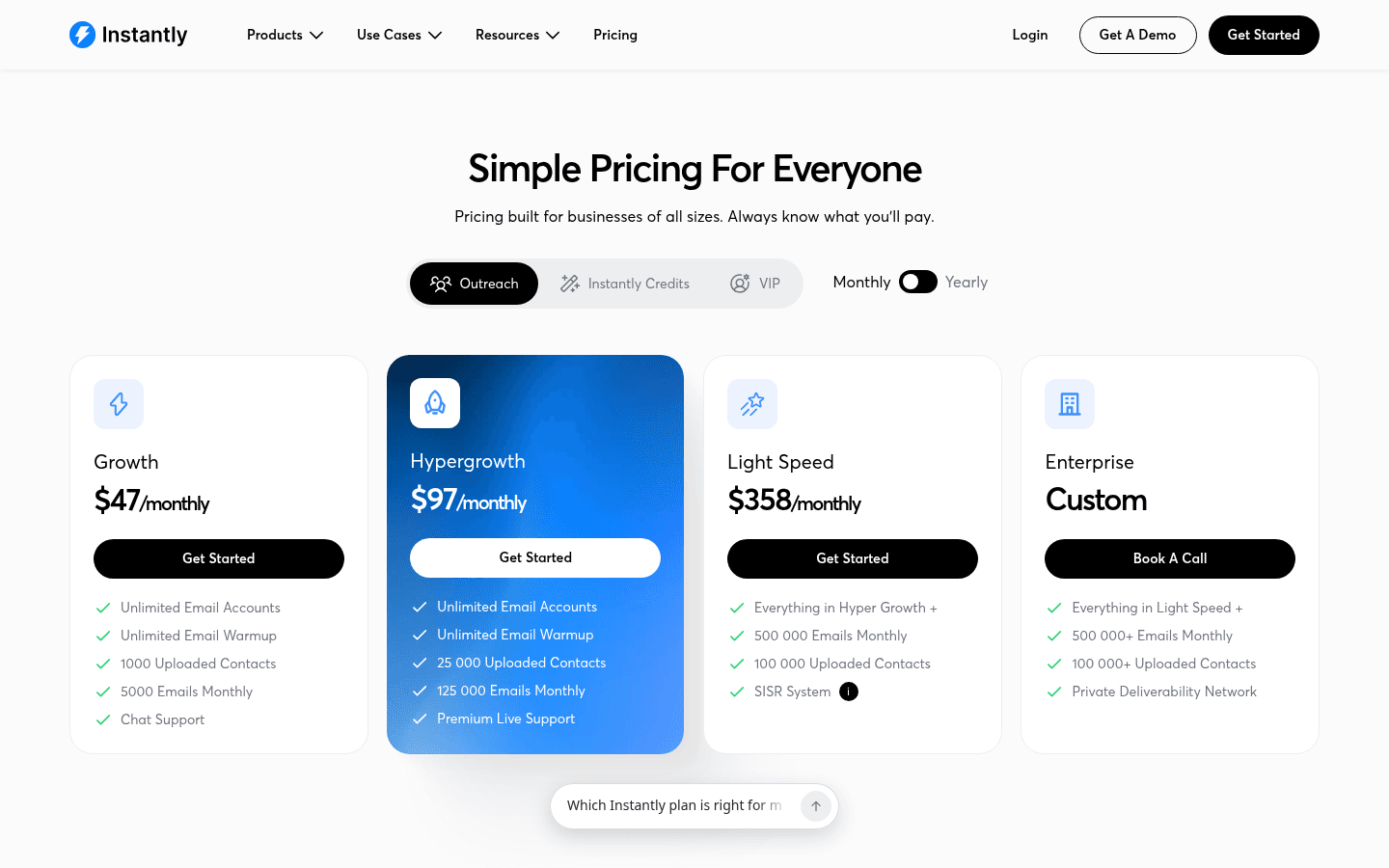
| Instantly | Cold email platform with warmup included | Flat per plan | Outreach Growth $47/mo monthly, or $37.6/mo billed yearly | None stated on the plans compared here | Unlimited email accounts and unlimited warmup on Growth, with 5,000 emails monthly |
| SuperWarm | Standalone warmup for Google Workspace and Microsoft 365 | Flat | Free for 10 mailboxes; unlimited for $49/mo, billed monthly (no annual plan) | Free plan, 10 mailboxes; no trial | Connects through OAuth; warms only, does not send |
What warmup costs at 1, 10, 25 and 50 mailboxes
A per-mailbox price can look cheap on the pricing page and turn expensive at the scale cold email usually runs at. The table below multiplies each tool's listed price by the mailbox count. Per-mailbox tools are shown at their list rate. Warmup Inbox says its per-inbox price comes down from the second inbox, so its figures are a ceiling. MailReach's pricing calculator gives the exact total for your count.
| Tool (plan) | 1 mailbox | 10 mailboxes | 25 mailboxes | 50 mailboxes | Billing basis |
|---|---|---|---|---|---|
| SuperWarm | $0 | $0 | $49/mo | $49/mo | Monthly only, no annual plan |
| Warmforge ($10/slot) | $0 with the free slot | $100/mo | $250/mo | $500/mo | Billed quarterly |
| MailReach ($19.5/mailbox, list rate) | $19.50/mo | $195/mo | $487.50/mo | $975/mo | Monthly |
| Warmup Inbox Basic ($15/inbox, ceiling) | $15/mo | $150/mo | $375/mo | $750/mo | Billed yearly |
| Instantly Outreach Growth | $37.60/mo | $37.60/mo | $37.60/mo | $37.60/mo | Billed yearly ($47/mo monthly) |
| lemlist Email (includes lemwarm) | $55/mo | $55/mo | $55/mo | $55/mo | Billed yearly |
Sources: Warmforge pricing, MailReach pricing, Warmup Inbox pricing, Instantly pricing, lemlist pricing. Warmforge also offers one free slot on a first workspace. Warmup Inbox quotes prices individually past 50 inboxes.
The pattern is plain. Per-mailbox tools win at one or two inboxes, and flat-priced tools win once you run several domains. The flat prices on Instantly and lemlist also buy a sending platform. If you already send from somewhere else, you would be paying for software you do not use.
Warmforge
Warmforge sells warmup by the mailbox slot. Warmforge's pricing page explains that a slot is a place for any mailbox, so 10 slots let you connect any 10 mailboxes. The listed rate is $10 per slot per month, billed quarterly, and the page says annual billing gives two months free. A subscription includes automated AI warmup, one free placement test per month, and health checks on each mailbox's DNS and MX records and blacklist status.
Warmforge's FAQ says there is no free trial, because you need to buy slots to warm anything. Its homepage offers one free warming slot for a Google or Microsoft mailbox and one free placement test that renews monthly. Placement tests are also sold as a separate subscription. The Pro plan gives 100 tests per month at 50 mailboxes per test for $32.5/mo billed annually or $39/mo billed monthly. The Growth plan gives unlimited tests at 250 mailboxes per test for $140.8/mo billed annually or $169/mo billed monthly. Salesforge users get unlimited Warmforge slots included.
Best for: teams that want warmup and placement testing in one place and run a modest number of mailboxes.
Lemwarm
Lemwarm comes with lemlist, an outbound platform that covers lead data, multichannel sequences and sending. lemlist's pricing page answers the question directly: lemwarm and its deliverability protections are included in all plans. The Email plan is $55/mo billed yearly. It includes unlimited users and email senders, 50,000 emails per month, a lead database, and the email warmup and deliverability hub. The Multichannel plan is $87/mo billed yearly and adds LinkedIn, SMS and calling. Enterprise is priced on request. A 14-day free trial needs no credit card.
Best for: teams already sending from lemlist, or teams choosing lemlist as their sender anyway. For those teams, warmup adds nothing to the bill.
MailReach
MailReach sells warmup together with spam testing. The All-In-One plan on MailReach's pricing page is $19.5 per mailbox per month on monthly billing, and annual billing is marked as saving 20%. Every warmup plan includes at least 20 spam test credits. The plan list covers a "smart AI warming algorithm", warmup across multiple providers including Google and Outlook, up to 100 emails per day, a reputation dashboard, and domain and inbox health checks for blacklists, SPF, DKIM, DMARC and ETS. MailReach says it works with any provider that supports SMTP. It describes its network as Google Workspace and Office 365 inboxes. Spam testing can also be bought on its own, and agencies can ask for custom pricing.
Best for: senders who want to diagnose a reputation problem. Bundled spam tests show where mail is landing while the warmup runs.
Warmup Inbox
Warmup Inbox prices by plan and by inbox. On yearly billing, Warmup Inbox's pricing page lists three plans:
- Basic: $15/mo for one inbox ($180 billed yearly), 75 warmup messages a day, and replies to up to 25% of warmup emails.
- Pro: $49/mo for one inbox ($588 billed yearly), 250 messages a day. Adds your own templates, language warmup and ESP-specific warmup.
- Max: $79/mo for one inbox ($948 billed yearly), 1,000 messages a day. Adds a technical setup check.
The page says annual billing saves 20% against monthly. It also says the per-inbox price drops from the second inbox, and that accounts past 50 inboxes get a quote. Every plan starts with a 7-day free trial and no credit card.
Warmup Inbox's homepage describes a network of 30,000+ real inboxes and OAuth connection for Gmail, Outlook or any SMTP account. It also describes daily monitoring of more than 100 blacklists. The homepage publishes an internal benchmark of 98% Primary placement against an 83% average for other tools. That figure is Warmup Inbox's own measurement.
Best for: one or a few inboxes, on any provider, where you want control over warmup volume and content.
Instantly
Instantly is a cold email platform, and warmup is part of its outreach plans. The Outreach Growth plan on Instantly's pricing page lists unlimited email accounts and unlimited email warmup. It also includes 1,000 uploaded contacts and 5,000 emails a month, for $47 billed monthly or $37.6/mo billed yearly. Higher plans raise the other limits:
| Plan | Monthly billing | Yearly billing | Contacts | Emails a month |
|---|---|---|---|---|
| Hypergrowth | $97/mo | $77.6/mo | 25,000 | 125,000 |
| Light Speed | $358/mo | $286.3/mo | 100,000 | 500,000 |
Light Speed also adds Instantly's SISR system of dedicated server and IP blocks. Enterprise is priced on request. Bundles that add lead credits start at $94/mo on monthly billing.
Best for: anyone who wants warmup and sending in one tool with no per-mailbox charge.
SuperWarm
SuperWarm warms Google Workspace and Microsoft 365 mailboxes and nothing else. You connect each mailbox through OAuth, so no app passwords or SMTP settings are needed. The provider pages for Gmail and Google Workspace warming and Outlook and Microsoft 365 warming cover each setup. Up to 10 mailboxes are free. Past that, one flat $49/mo plan, billed monthly with no annual plan, covers unlimited mailboxes. SuperWarm does not send campaigns. You keep sending from whatever tool you use now.
Best for: teams with many Google or Microsoft mailboxes who already have a sender and do not want warmup costs to grow with every new domain.
Which one to pick
- You already send from lemlist or Instantly: use the warmup you already pay for. Both list it as included, and a second warmup tool on the same mailboxes adds cost without a clear reason.
- You need a sender and warmup together: Instantly's Growth plan has the lowest entry price of the two bundles, at $37.6/mo billed yearly, with unlimited accounts.
- You have one or two inboxes on any provider: Warmup Inbox's Basic plan or a single Warmforge slot keeps the bill small.
- Your domain is already in trouble and you need to see where mail lands: MailReach bundles spam tests with warmup, and Warmforge sells placement tests on their own.
- You run many Google Workspace or Microsoft 365 mailboxes and send with your own tool: a flat-priced standalone tool keeps the cost the same at 10, 25 or 50 mailboxes. SuperWarm is built for that case.
FAQ
- What is email warmup?
- Email warmup builds a new or damaged mailbox's reputation before you send campaigns from it. A warmup tool sends and receives messages between your mailbox and a network of other inboxes. It opens and replies to those messages and moves any that land in spam back to the inbox. Mailbox providers read that activity as signs of a legitimate sender.
- Does email warmup still work, or is it fake engagement?
- Warmup helps with one thing: it gives a fresh mailbox a history of normal sending instead of no history at all. It does not make unwanted email wanted. Once your campaigns start, Gmail and Outlook judge you mostly by how your real recipients react. If they ignore you or mark you as spam, your reputation drops whatever your warmup score says. Treat warmup as the ramp before sending and a steady background signal afterward. It cannot replace a clean list, correct SPF, DKIM and DMARC records, and modest daily volume per mailbox.
- Can I warm up email for free?
- Yes, within limits. SuperWarm has a free plan for up to 10 Google Workspace or Microsoft 365 mailboxes. It is a standing free plan, not a time-limited trial. Warmforge offers one free warming slot for a Google or Microsoft mailbox. Warmup Inbox and lemlist offer free trials of 7 and 14 days, which run out before a typical warmup finishes.
- How long does warmup take?
- SuperWarm's guide says most new Google Workspace or Microsoft 365 mailboxes need 2 to 4 weeks of consistent daily warming before you meaningfully raise your sending volume. A fresh domain often needs the full range or longer, and a mailbox with a flagged history takes longer to recover. Our guide to how long to warm a mailbox walks through the timeline and the signs a mailbox is ready.
- Should I keep warming after campaigns start?
- Most cold email setups leave warmup running alongside campaigns. Warmup traffic then keeps a positive signal in the mix while campaign volume rises. This is one reason flat pricing matters: you pay for warmup for as long as the mailbox sends, not just the first few weeks.
- Do I need a separate warmup tool if my sending platform includes one?
- Usually not. lemlist lists lemwarm as included in all plans, and Instantly's outreach plans list unlimited warmup. A standalone tool makes sense when your sender has no warmup, or when you send from several platforms and want one place to manage every mailbox.
- I warm several domains. How do I keep the cost down?
- Count your mailboxes and price them at your real number, not at one. Under per-mailbox pricing, six domains with a few inboxes each quickly cost more than a flat plan. The cost table above shows where each pricing model crosses over.
- Why is my email still going to spam after warming up?
- Warmup builds reputation but does not fix the causes of spam placement. Common causes are missing or broken SPF, DKIM or DMARC records, sending too much per mailbox too soon, poor lists that bounce or draw complaints, and copy that looks like bulk mail. Sending cold email from your main business domain is another, since one bad campaign can then hurt all your mail. Check those first. A placement test or spam test, which MailReach and Warmforge both sell, shows which providers are filtering you.
Start warming
If your mailboxes are on Google Workspace or Microsoft 365 and you already have a sender, you can create your SuperWarm account and connect up to 10 mailboxes free through OAuth. When you need more, the $49/mo plan covers unlimited mailboxes.