Most people searching for an Instantly alternative want one of two different things. Some want a new place to send cold email from: more volume per dollar, a different inbox, LinkedIn steps, better support. Others mainly want warmup that suits their setup, or they pay for an Instantly plan mostly to keep a few mailboxes warm. These two groups need different tools, so this comparison sorts the options by which problem each one solves. It uses each tool's own pricing page, as read on October 12, 2026.
Who this comparison is for
- You send from Instantly and want a different sender. Smartlead and lemlist are the two senders in this comparison. Both include warmup.
- You like your sender but want to change your warmup. Warmbox, MailReach, Warmup Inbox and SuperWarm only warm mailboxes. You keep sending from Instantly or any other tool.
- You are starting out with one to ten mailboxes and are not sure you need a paid tool yet. The FAQ at the end covers what to fix before you pay for anything.
How the tools were compared
Each tool was judged on five things a buyer leaving Instantly asks about:
- 1.Entry price and billing period. Several of these sites show different prices for monthly and yearly billing, so the table marks which period each price belongs to.
- 2.What the entry plan caps. This means emails, contacts, inboxes or warmup messages per day.
- 3.Whether warmup is the product or a feature. Senders bundle warmup into an outreach plan. Standalone tools price warmup per inbox or per plan.
- 4.Which mailbox providers it connects to. This matters most for Google Workspace and Microsoft 365.
- 5.Free plan or trial, where the pricing page states one.
Side-by-side comparison
| Tool | What it is | Entry price | Entry plan caps | Higher plans | Free plan or trial |
|---|---|---|---|---|---|
| Instantly | Cold email sender with built-in warmup | Outreach Growth: $47/mo monthly, $37.60/mo yearly | Unlimited email accounts and warmup, 1,000 uploaded contacts, 5,000 emails/mo | Hypergrowth $97/mo monthly or $77.60/mo yearly (25,000 contacts, 125,000 emails/mo); Light Speed $358/mo monthly or $286.30/mo yearly; Enterprise custom | |
| Smartlead | Cold email sender with built-in warmup | Base: $39/mo monthly, $32/mo yearly | 2,000 contacts, 6,000 sends/mo, Foundation warmup tier | Pro $94/mo monthly or $78/mo yearly; Smart $174/mo monthly or $144/mo yearly; Prime $379/mo monthly or $315/mo yearly | Free to try, pick a plan later |
| lemlist | Multichannel outbound platform with lemwarm included | Email: $55/mo (yearly billing) | 50,000 emails/mo, unlimited users and senders | Multichannel $87/mo per user (yearly); Enterprise custom | 14-day trial, no card |
| Warmbox | Standalone warmup | Solo: $15 or $19/mo depending on billing period | 1 inbox, 50 emails/day, 1 team member | Start-up $69 or $79/mo (3 inboxes, 250/day); Growth $139 or $159/mo (6 inboxes, 500/day); custom | |
| MailReach | Standalone warmup plus spam testing | All-In-One: $19.50 per mailbox per month | At least 20 spam test credits, up to 100 emails/day | Price scales per mailbox; annual billing saves 20%; agency pricing by request | Free spam test |
| Warmup Inbox | Standalone warmup | Basic: $15/mo for 1 inbox ($180 billed yearly) | 75 warmup messages/day | Pro $49/mo ($588/yr, 250/day); Max $79/mo ($948/yr, 1,000/day); quoted past 50 inboxes | 7-day trial, no card |
| SuperWarm | Standalone warmup for Google Workspace and Microsoft 365 | Free | 10 mailboxes | Unlimited mailboxes for $49/mo | Free plan |
What warming one mailbox costs
This view is the one the other comparisons skip. If warmup is the only reason you pay for Instantly, the useful number is the lowest price at which each tool will warm a single mailbox, and what else you pay for at that price.
| Tool | Lowest price that warms one mailbox | Billing period | What else that price includes |
|---|---|---|---|
| SuperWarm | $0 | Free plan | Up to 10 mailboxes |
| Warmup Inbox | $15/mo | Billed yearly ($180) | Nothing beyond warmup and monitoring; 75 warmup messages/day |
| Warmbox | $15 or $19/mo | Depends on billing period | 50 emails/day, 1 team member |
| MailReach | $19.50/mo | Per mailbox | 20 spam test credits |
| Smartlead | $32/mo | Yearly | A sender with 6,000 sends/mo and 2,000 contacts |
| Instantly | $37.60/mo | Yearly | A sender with 5,000 emails/mo and 1,000 contacts |
| lemlist | $55/mo | Yearly | A sender with 50,000 emails/mo and a lead database |
The sender prices are not too high. They pay for a sender. If you do not use the sending side, you are paying for something you do not need.
Instantly, the baseline
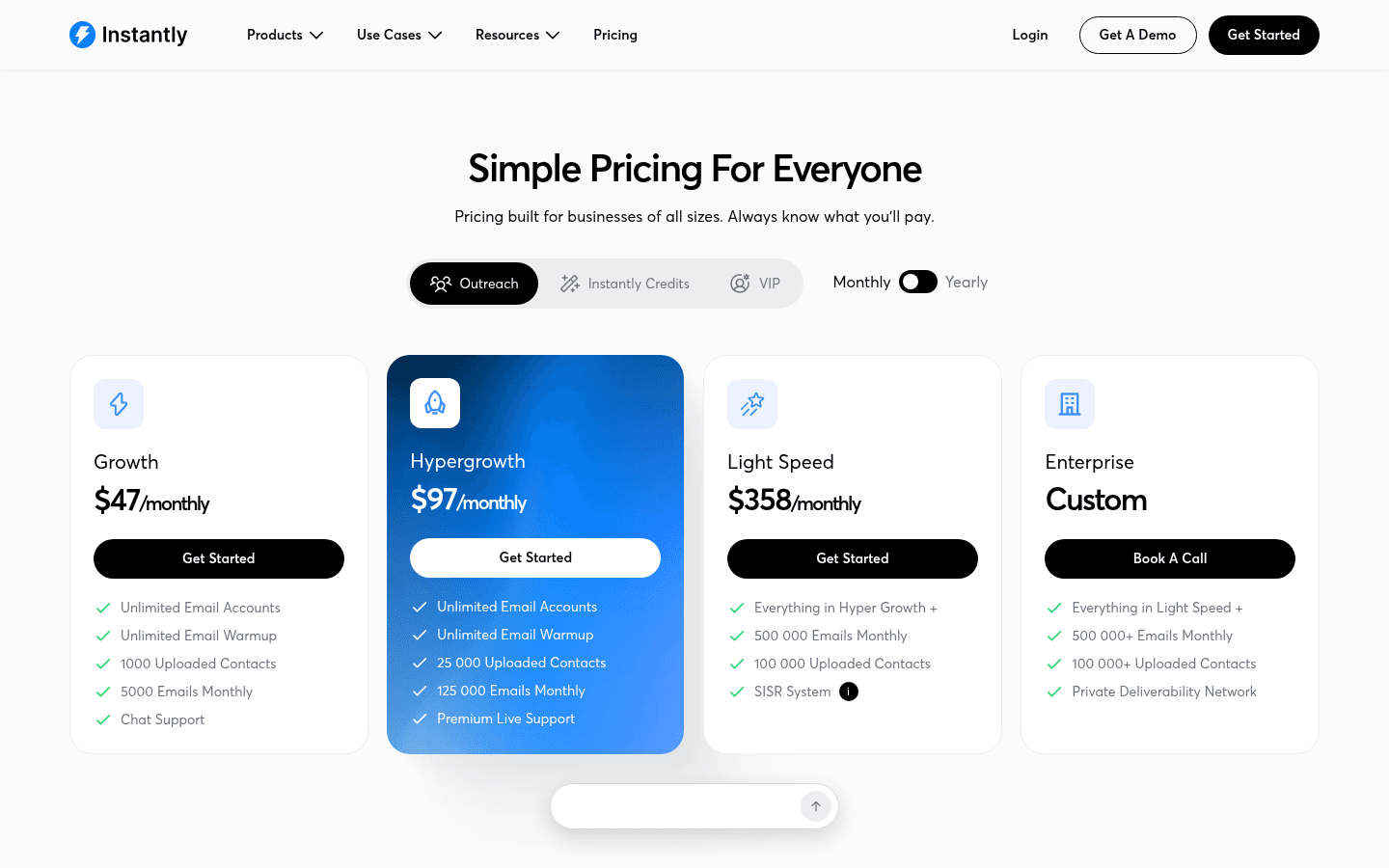
Instantly's pricing page splits the product into separate subscriptions: Outreach, Instantly Credits (its lead database and enrichment), and bundles that combine them. The Outreach Growth plan is $47 a month on monthly billing or $37.60 a month on yearly billing. It includes unlimited email accounts, unlimited warmup, 1,000 uploaded contacts and 5,000 emails a month. Hypergrowth raises that to 25,000 contacts and 125,000 emails for $97 a month, or $77.60 on yearly billing. Light Speed adds 500,000 emails a month and Instantly's SISR system, which assigns dedicated server and IP blocks, for $358 a month or $286.30 yearly.
The lead database is billed separately, starting with Growth Credits at $47 a month for 1,500 credits. The bundles combine both. Starter costs $94 a month, or $85 on yearly billing, for 5,000 emails, 1,000 contacts and 1,500 credits.
Instantly's unlimited warmup is generous for anyone who already sends from it. Many leave because of the contact and email caps on Growth, not because of the warmup.
Smartlead
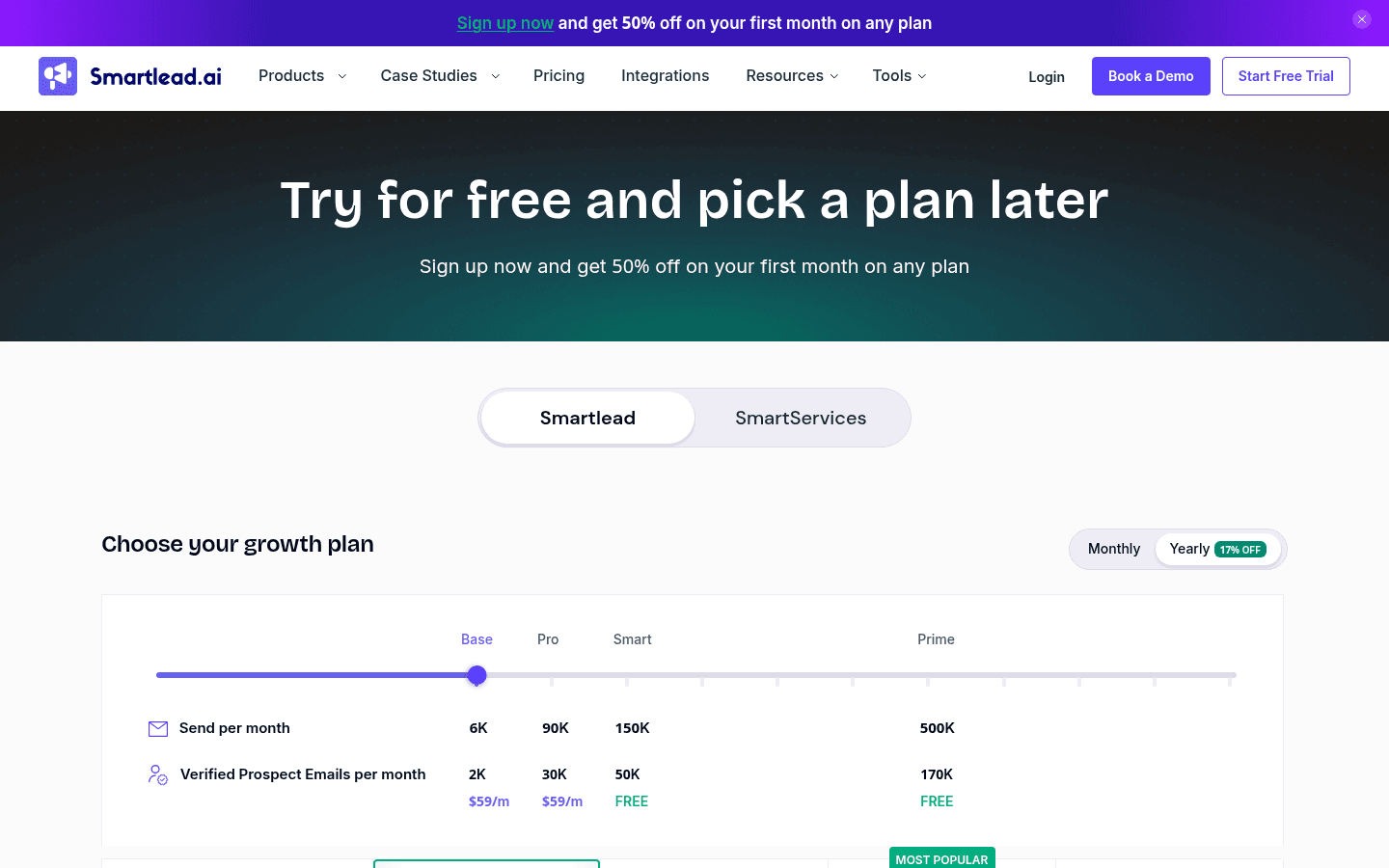
Smartlead is the most direct swap if you want another cold email sender. Its Base plan costs $39 a month on monthly billing or $32 a month on yearly billing. It includes 2,000 contacts, 6,000 email sends a month and the Foundation tier of its warmup pool. CRM access, API and webhooks start on Pro, which costs $94 a month or $78 yearly, with 30,000 contacts, 90,000 sends and the Growth warmup tier. Smart costs $174 a month or $144 yearly, with unlimited contacts, 150,000 sends, calling, and the Premium warmup pool, which is eligible for Smartlead's Ultra Premium Warmup. Prime costs $379 a month or $315 yearly, with 500,000 sends, three SmartServers, three or more client workspaces and a dedicated manager.
Add-ons are priced on the same page. Client workspaces cost $29 each and private servers $39 each on Pro and Smart. Smartlead also sells mailboxes through SmartSenders. A fresh Google mailbox costs $4.50 a month plus $13 per domain per year, and a pre-warmed one costs $9 a month plus $18 per domain per year.
Pick Smartlead if you send at volume, want warmup bundled in, and need the per-client add-ons an agency uses.
lemlist
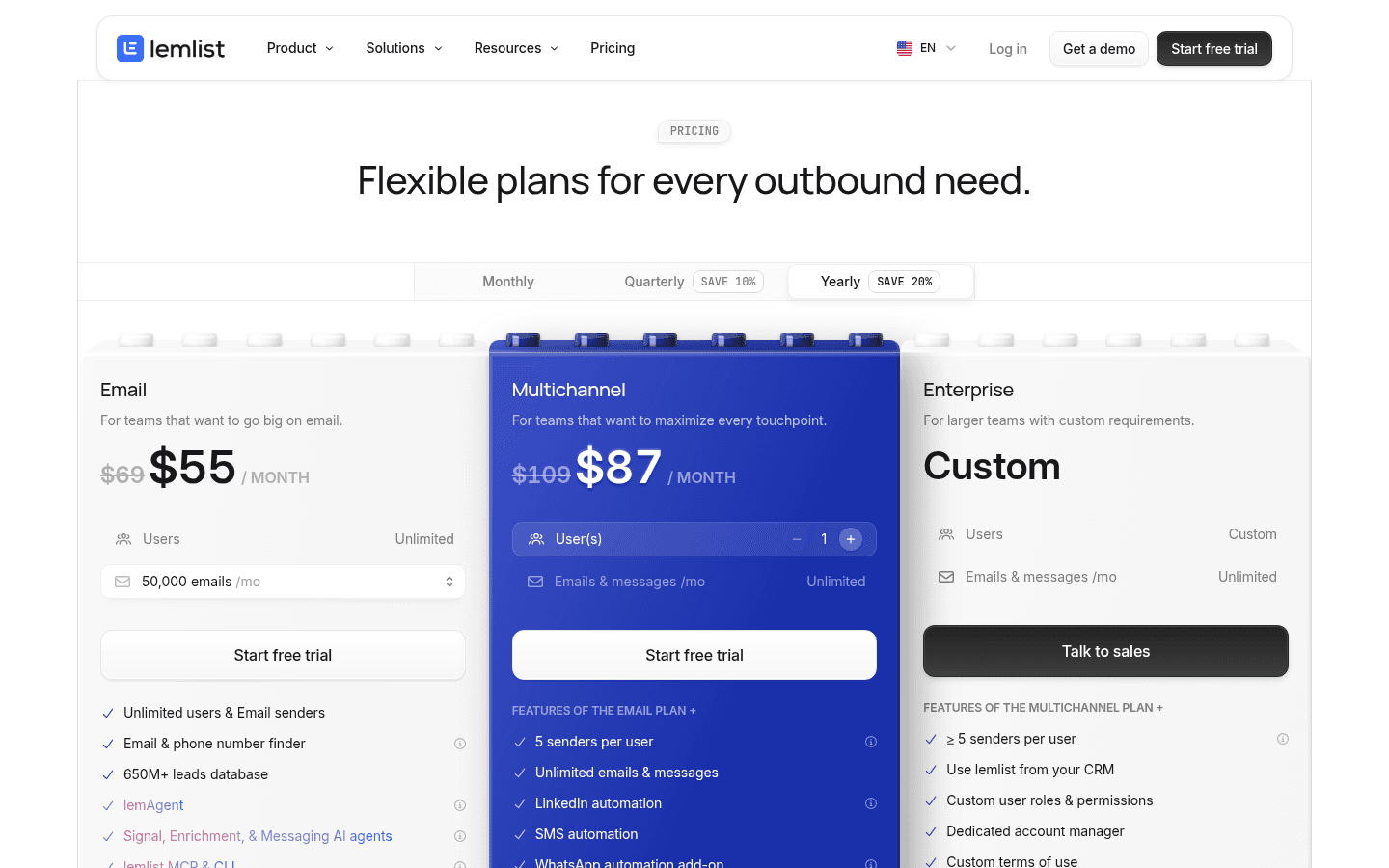
lemlist's prices below are yearly prices, which save 20% against monthly. The Email plan costs $55 a month and includes 50,000 emails a month, unlimited users and email senders, the email and phone finder, its 650M+ lead database, and email warmup with lemlist's deliverability hub. Multichannel costs $87 a month per user. It adds unlimited emails and messages, LinkedIn automation, SMS, calling with a power dialer, and a WhatsApp add-on. Enterprise is custom.
lemlist's FAQ confirms that lemwarm and its deliverability protections are included in all plans. Its inbox delivery page describes inbox rotation, per-inbox volume caps, timezone-aware sending and list verification. The trial runs 14 days with no credit card and includes the Multichannel features except in-app calls.
Pick lemlist if leaving Instantly means adding LinkedIn and phone steps to the same sequence.
Warmbox
Warmbox only warms mailboxes. It connects Gmail and Google Workspace through OAuth, Outlook and Microsoft 365, and also Yahoo, iCloud, AOL, Yandex, Zoho, SendGrid, Sendinblue, Mailgun, Amazon SES and any SMTP inbox. Its pricing page shows two prices for each plan, one per billing toggle: Solo at $15 or $19 a month, Start-up at $69 or $79, and Growth at $139 or $159. Solo warms 1 inbox at 50 emails a day with 1 team member. Start-up warms 3 inboxes at 250 a day with 3 members. Growth warms 6 inboxes at 500 a day with 6 members and enterprise support. Larger plans are custom.
Every plan includes auto-removal from spam, auto-replies, spam score monitoring, a choice of growth, flat or random warmup curves, and a private inbox network. Warmbox's FAQ says first results usually take 15 to 30 days of uninterrupted warming. A head-to-head of SuperWarm and Warmbox goes further on these two.
Pick Warmbox if you warm mailboxes on providers beyond Google and Microsoft, such as Zoho, SES or a custom SMTP server.
MailReach
MailReach combines warmup with spam testing. Its All-In-One plan costs $19.50 per mailbox per month. It always includes at least 20 spam test credits, warmup across Google, Outlook and other providers at up to 100 emails a day, a reputation dashboard, and blacklist, SPF, DKIM and DMARC checks. Annual billing saves 20%. Spam test credits are also sold on their own, and agencies can ask for custom pricing. MailReach's homepage offers a free spam test, and the site describes its warmup network as Google Workspace and Office 365 inboxes.
Pick MailReach if you want to test where your real campaigns land, not just watch a warmup score.
Warmup Inbox
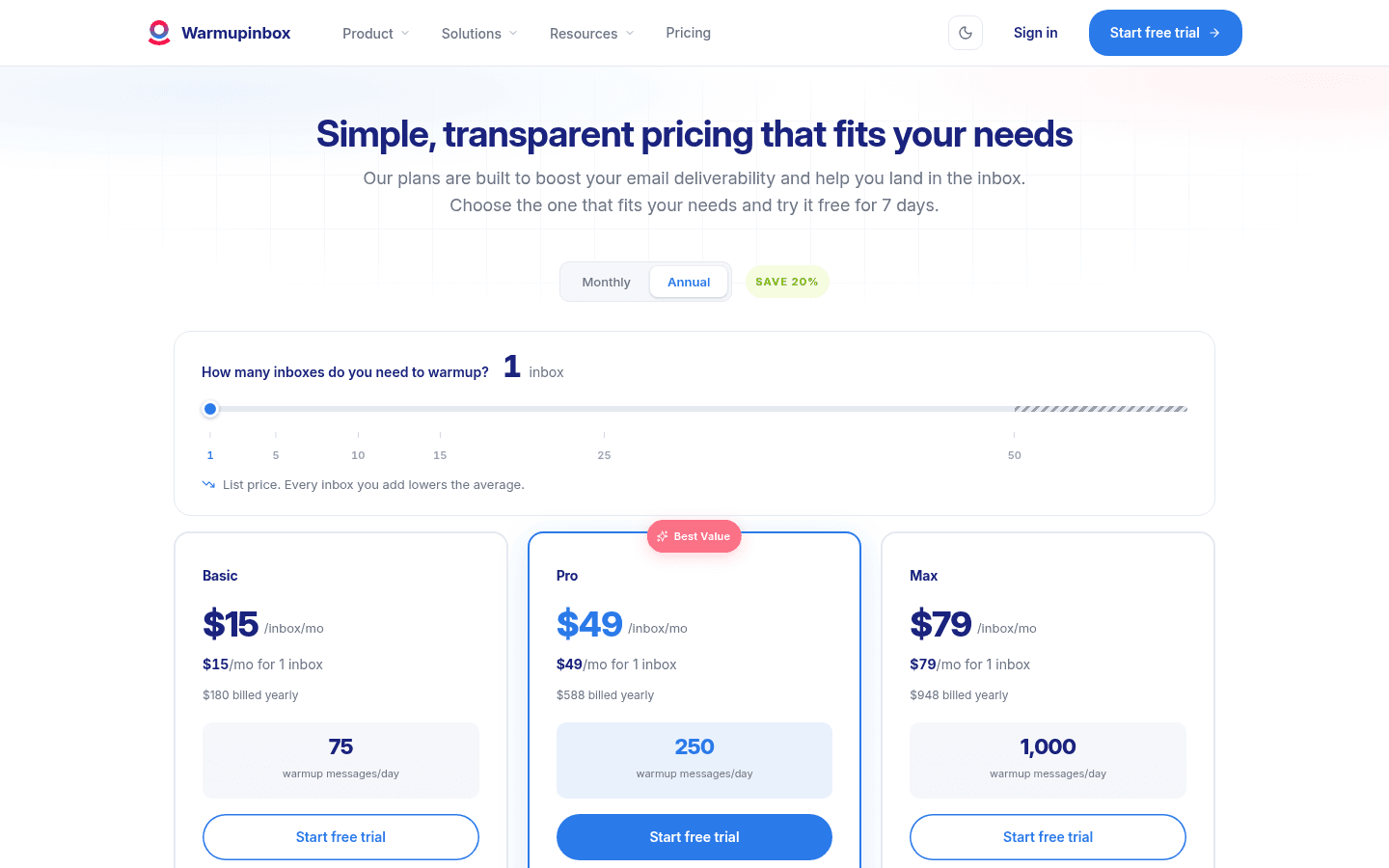
Warmup Inbox prices per inbox, and the prices below are its yearly ones. Basic costs $15 a month for one inbox ($180 billed yearly) at 75 warmup messages a day. Pro costs $49 a month ($588 yearly) at 250 a day and adds custom templates, warmup topics, language warmup, ESP-specific warmup and scheduling. Max costs $79 a month ($948 yearly) at 1,000 a day with premium support and a technical setup check. The site says the per-inbox price drops from the second inbox, and pricing is quoted past 50 inboxes. It describes a network of more than 30,000 real inboxes.
The trial runs 7 days with only an email address and no credit card. Its integrations include Gmail and Workspace and Outlook and Microsoft 365.
Pick Warmup Inbox if you want to control the warmup itself: pace, topics, language and schedule.
SuperWarm
SuperWarm is ours, and it only warms mailboxes. It is not a sender, so you keep sending from Instantly, Smartlead, lemlist or anything else. It connects Google Workspace and Microsoft 365 mailboxes through OAuth. It is free for up to 10 mailboxes, and unlimited mailboxes cost $49 a month. Setup is covered in the guides for Google Workspace warming and Microsoft 365 warming.
Pick SuperWarm if your mailboxes are on Google or Microsoft and you want warmup without paying for a sending plan. If you need SMTP or other providers, Warmbox covers more of them.
The pick
- You need a new sender: Smartlead if volume and agency add-ons matter most. lemlist if you want LinkedIn, calls and SMS in the same sequence.
- You need warmup on providers other than Google and Microsoft: Warmbox.
- You want spam testing next to warmup: MailReach.
- You want to tune warmup content and pace: Warmup Inbox.
- You want Google Workspace or Microsoft 365 warmup at the lowest cost: SuperWarm, free for the first 10 mailboxes. You can create your free account and connect a mailbox through OAuth.
Before you switch anything
A warmup tool cannot fix a weak setup, so check these first:
- Authentication. Set up SPF, DKIM and DMARC correctly on every sending domain before any warmup starts.
- List quality. Verify addresses before you send. Bounces on a young domain hurt it faster than skipping warmup does.
- Volume. Start new mailboxes with a small number of relevant, one-to-one emails and increase only while delivery stays healthy.
- Measure placement. A good warmup score is not the same as landing in the inbox. Test where real campaign emails arrive.
FAQ
- Can I keep sending from Instantly and warm somewhere else?
- Yes. Standalone warmup tools connect to the mailbox itself, not to your sender. To avoid two warmup schedules on the same mailbox, turn off warmup in Instantly for any mailbox you move to another warmup tool.
- Does email warmup still work?
- Warmup builds a sending history on a new mailbox, but it does not guarantee inbox placement. Mailbox providers judge you mainly by how your real recipients respond. Warmup helps a new mailbox start out, while list quality and relevant copy decide where your campaigns land afterwards.
- Do I need a paid tool for one mailbox?
- Often not at first. With one mailbox you can build history by hand with real conversations while you fix authentication. If you want automation, free plans exist. SuperWarm warms up to 10 Google or Microsoft mailboxes free, and Warmup Inbox and lemlist offer trials without a card.
- How long should a new mailbox warm before cold outreach?
- Warmbox's FAQ puts first results at 15 to 30 days of uninterrupted warming. Our guide on how long to warm a mailbox covers what changes that timeline.
- Which alternative is cheapest?
- It depends on which problem you are solving. For sending, Smartlead's Base plan at $32 a month on yearly billing is the lowest entry price here. For warmup alone on Google Workspace or Microsoft 365, SuperWarm's free plan costs nothing for up to 10 mailboxes.